

ionCube Loader is the runtime partner to ionCube Encoder which actually runs your encoded files on deployment machines. One useful feature of the Loader is that it includes runtime compatibility support which allows existing encoded files to run on future PHP versions where technically possible.
This capability helps software vendors adopt newer PHP releases with greater flexibility as they won’t always need to re-encode and redistribute code in order to support new PHP versions.
Here’s an example…
Your code may be based on PHP 8.2 syntax but when encoded, can run on PHP 8.2, 8.3, 8.4 and 8.5 if you have the appropriate Loader installed at runtime.
Because PHP evolves over time, this compatibility cannot always be extended indefinitely. Support is provided where technically possible and depends on the nature and complexity of changes introduced by PHP itself. As a result, compatibility often spans multiple releases within the same PHP generation, but does not typically extend across major language transitions such as PHP 7 to PHP 8.
Here are a few compatibility examples:
PHP 7.1–7.4 encoded files can run on up to PHP 7.4
PHP 8.2–8.4 encoded files can run on up to PHP 8.5
Let’s use the PHP range selector to simplify this…
With ionCube Encoder’s PHP language range option (introduced in version 15), you don’t need to commit these rules to memory. Just set the PHP range you want to support and ionCube will do the rest, assembling the most efficient set of code bundles to support your target PHP range.
The encoder decides what file sets need to be encoded behind the scenes so you don’t need to understand these compatibility rules in depth, just how to set your range options.
The lower range option is set based on the PHP language syntax you use in your code and the upper range option is the maximum PHP version you want to target at runtime. For example, my code is based on PHP 7.1 syntax so that is the minimum version of PHP I can support in my range selection. I want to run my code on up to PHP 8.4 so that is my upper range selection.
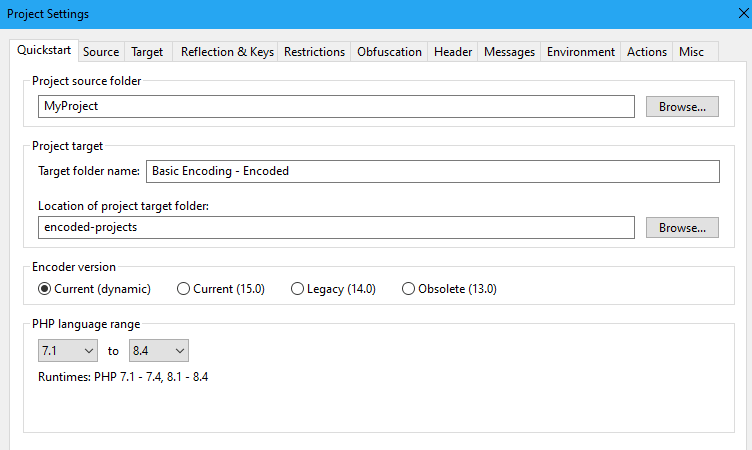
The example above is set to PHP 7.1-8.4 as the range. In this example the Encoder would automatically add together a PHP 7.1 encoded file set (for 7.1 to 7.4 runtime support), a PHP 8.1 set (this one just covers PHP 8.1 due to compatibility constraints) and a PHP 8.2 file set (for PHP 8.2 to 8.5 runtime support).
In this example, the Encoder range selector stops at PHP 8.4 but a newer Loader release allows those same files to run on PHP 8.5. The software developer would not have needed to re-encode their files at all in order to support PHP 8.5 as a Loader update handled that.
Why is this important?
Runtime compatibility can help reduce the operational impact of PHP upgrades. In some cases, applications encoded using earlier Encoder versions may continue running successfully on PHP releases that were not available when those files were originally encoded.
For software vendors, this can provide additional flexibility when supporting customers across a range of hosting environments. For hosting providers and end users, it can help make PHP upgrades smoother while maintaining compatibility with existing encoded applications.
As PHP continues to evolve, ionCube regularly reviews opportunities to extend runtime compatibility where technically possible. The compatibility examples shown above are accurate at the time of writing and may be expanded further in future Loader releases.
Check out ioncube.com for the latest PHP version support and look out for the term ‘runtime support’ which refers to what we have discussed in this article.